

AI for critical media analysis is rapidly emerging as a powerful way to sift through the endless flurry of headlines and opinions you see every day. Whether you are a parent teaching kids to spot distorted news stories, an educator guiding students in media literacy, or a business professional striving to stay objective in a polarized climate, leveraging AI can give you valuable insights. This ultimate guide walks you through the fundamentals of identifying bias in media and shows you how friendly AI tools, such as BiasBreaker (https://biasbreaker.org) and Bridger (https://thebridger.org), can help you see through the noise. By the end, you will be better prepared to navigate the news with a balanced perspective and engage in thoughtful discussions of the world around you.
Recognize different forms of news bias
Before you dive into AI-driven solutions, it is crucial to recognize the most common forms of news bias. Bias can appear in subtle language cues, choice of images, and even the omission of certain facts. When you understand these patterns, you become better equipped to evaluate any piece of media, whether it is a breaking news segment or a long-form analysis.
Types of bias you may encounter
- Spin bias: Language that sensationalizes or downplays an issue can signal spin bias. This often involves choice words aimed at influencing how you feel about a topic rather than delivering straightforward facts.
- Selection bias: Media outlets sometimes highlight specific facts and disregard others to direct attention toward a certain angle. When you notice missing details or one-sided reporting, selection bias may be at play.
- Confounding bias: Publications may draw causal links between unrelated events, misleading you to believe that one event caused the other. This can distort the real picture.
- Confirmation bias: Readers also bring their own biases to the table. You might naturally seek out news that aligns with your worldview. Becoming conscious of this tendency helps you maintain objectivity.
How to spot red flags
As you read or watch a report, ask yourself these questions:
- Are multiple perspectives included, or is it purely one-sided?
- Does the language sound emotional or loaded with strong adjectives?
- Have important data or reputable sources been cited?
- Is there a clear motive that benefits one group or viewpoint over others?
Answering “yes” to some of these can point toward potential bias. Spending a few moments on these questions sets the stage for more advanced AI-based methods.
Use AI for quick bias checks
AI for critical media analysis is like having a diligent assistant devoted to parsing the daily deluge of information that floods your screens. When you rely on AI tools, you gain a more consistent, objective vantage point. While human oversight remains essential, letting AI handle the initial pass cuts down on time and effort so you can spend more energy interpreting the results.
Core benefits of AI-driven analysis
- Efficiency: AI can process large amounts of text in seconds, which is especially useful if you follow multiple news outlets or journals. You can swiftly identify patterns and zero in on problematic or biased segments.
- Consistency: By using fixed analytical criteria, AI tools do not succumb to mood swings or personal preferences. This single standard allows you to compare coverage across different sources.
- Depth: Some tools dig into linguistic nuances, including sentiment, word choices, and patterns of persuasion, providing a clear breakdown of how a narrative is structured.
Questions to ask AI tools
Even when you use AI, you need to approach the results critically. Ask:
- What is the overall sentiment score, and does it lean heavily positive or negative?
- Which words or phrases stand out as potentially biased or loaded?
- Are specific viewpoints underrepresented in the coverage?
- Does the data point to consistent patterns of one-sided reporting?
With these questions, you give AI a straightforward framework. From there, you can combine the AI’s findings with your judgment about the context, credibility, and relevance of each piece of news.
Check the Bias of any News Article
 Powered by AI
Analyze content with BiasBreaker
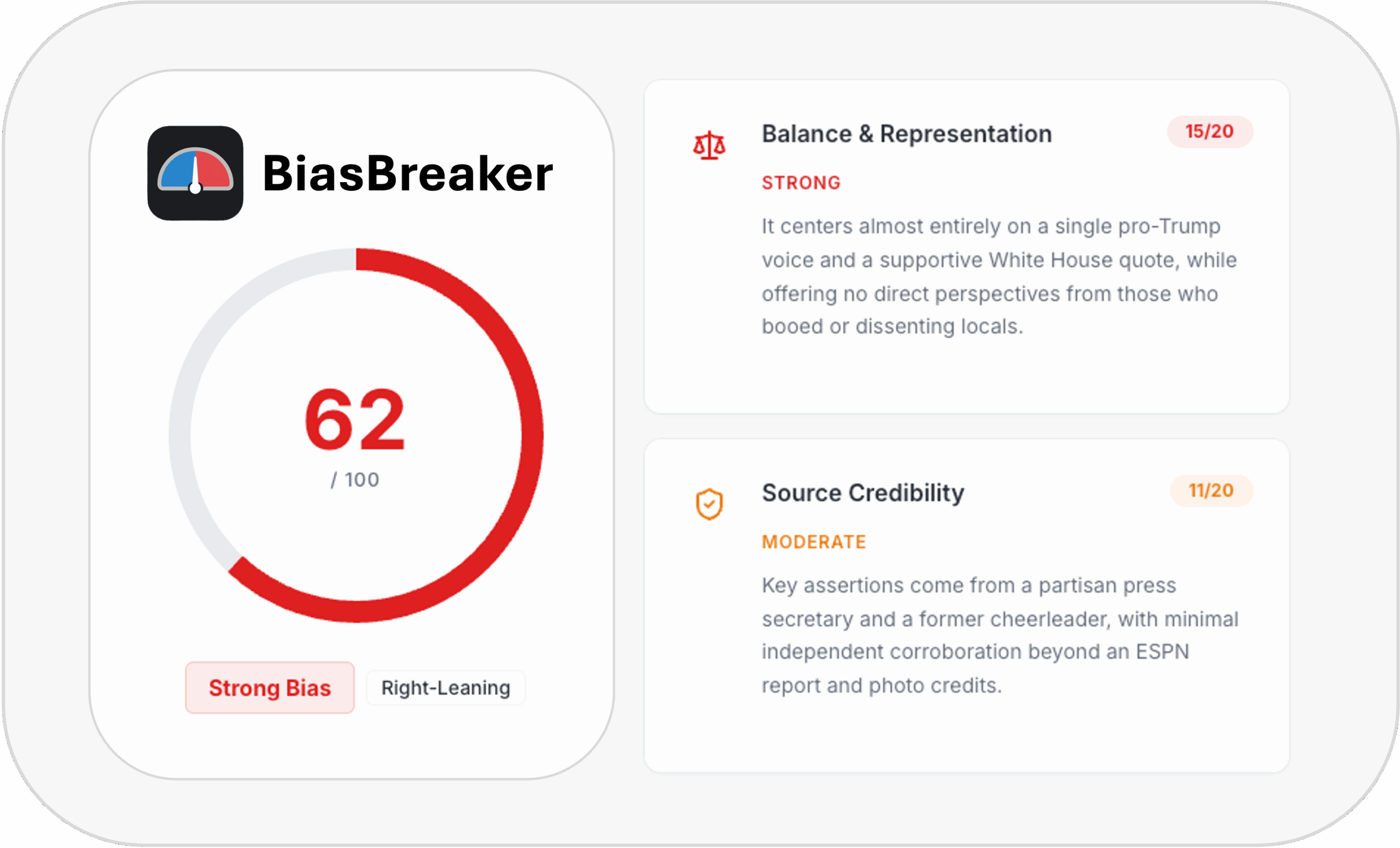
One AI option you can try is BiasBreaker (https://biasbreaker.org). This tool focuses on highlighting skewed language and sourcing patterns, giving you an instant snapshot of how a story is presented. If you are worried about the credibility of a source, or you suspect a publication might be pushing an agenda, BiasBreaker can serve as your first line of inquiry.
Steps to get started
- Identify your target material: Collect the article, blog post, or news clip you want to evaluate.
- Upload or link the content: BiasBreaker may allow you to input text directly or provide a URL.
- Review keyword analysis: The tool points out words that might frame an issue in a particular light. Terms tested by the platform are flagged for potential bias.
- Examine source variety: Do the cited sources come from a limited pool, or is there a balanced range of experts and viewpoints?
Interpreting the results
- Bias breakdown: The tool may assign a numeric rating or generate a summary that reveals whether the piece leans in a specific direction. Make note of the key reasons behind this rating.
- Visual cues: Some AI dashboards feature color-coded highlights. Phrases that imply strong bias can be marked in red or orange, while more neutral text remains uncolored.
- Action steps: Once you see how bias might operate in the text, consider retrieving information from additional sources that offer a different take. Comparing multiple angles brings greater clarity and helps you see what might be missing.
While BiasBreaker does not hand you the absolute truth, it does help you uncover how certain content is framed, making it easier to decide whether you should read more or weigh alternative viewpoints.
Bridge opposing viewpoints with Bridger
Another innovative resource is Bridger (https://thebridger.org). If you often find yourself trapped between two starkly different opinions, Bridger identifies assumptions on each side and maps out the middle ground. This approach is especially helpful when you are confronted with highly polarized discussions, whether they involve politics, economics, or social issues.
How Bridger finds balance
- Pinpointing assumptions: Bridger looks at the language used in each argument and flags the core beliefs and premises behind it. Often, the biggest divide stems from these underlying notions.
- Suggesting shared perspectives: By identifying where the two sides overlap, Bridger shows you the values or points that both parties might agree on. This common ground can serve as the starting point for more productive conversations.
- Generating a new narrative: The tool synthesizes elements from both sides, allowing you to explore a version of the debate that does not cling to extreme positions.
Make the most of Bridger’s insights
- Input two conflicting viewpoints: This might be two articles presenting polarized stances or a conversation you have observed on social media.
- Read the automatically generated assumptions: Note where each side’s argument seems to stem from. These assumptions often reveal hidden biases or incomplete views.
- Explore the suggested middle ground: Bridger might point to shared goals, interests, or concerns. This can foster deeper, more meaningful dialogue among family, colleagues, and friends.
- Continue the conversation: If you are a teacher, incorporate these findings in classroom discussions. If you are a parent, talk about them with your kids to encourage empathy and critical thinking. If you are a business professional, try to incorporate neutral data that addresses both sides’ concerns.
Bridger does not force you to abandon your opinions, but it does help you understand why others might see things differently. That understanding can defuse tension and highlight the solutions that benefit everyone.
Incorporate AI tools into daily habits
Using AI to evaluate news bias is not just a once-in-a-while activity. To make it a lasting part of your media literacy journey, consider weaving these tools into your daily or weekly routine. Over time, you will develop a sharper sense for bias, and you will rely less on AI alone.
Practical ways to embed AI
- Morning scan: Before you start your day, pick a top headline and run it through BiasBreaker or a similar tool. If you have a moment, use Bridger to compare two opposing takes on the same issue.
- Weekly reflection: Reserve a short time slot each week to review notable stories. Did your preferred sources present them in a balanced way? Which angles did they miss?
- Family discussions: If you have teenagers or older children, consider guiding them through this process. Show them how AI offers a more objective lens, and have them share any surprising insights.
- Professional settings: For business teams, it might be beneficial to schedule monthly sessions to discuss big economic or industry-related news. Add an AI check to keep conversations grounded in facts rather than speculation.
Building awareness step by step
Small acts of consistent use make AI a natural extension of your news analysis process. Eventually, you may discover that you can sense bias more readily, even without assistance. You will still appreciate how quickly AI processes voluminous content, but you will feel less dependent on it as your own knowledge base grows.
Practice critical thinking habits
No AI tool can replace your personal ability to question, analyze, and reason through complex information. When you sharpen your critical thinking, you become the ultimate gatekeeper of what to believe and what to question. AI for critical media analysis complements your skillset, but your ability to interpret subtle clues and context remains key.
Simple critical thinking exercises
- Ask “Who benefits?”: Whenever you read a headline, imagine who might benefit from a particular angle.
- Consider alternative explanations: Teach yourself to ask, “What if the opposite is true?” or “Could there be an entirely different cause?”
- Evaluate the evidence: Pay attention to footnotes, data citations, and direct quotes. A strong piece of reporting typically references credible experts or verifiable numbers.
- Anticipate objections: Try poking holes in the argument you are reading, and see if the article addresses those concerns.
Integrating AI with human judgment
- Start with AI: Use a tool to highlight questionable phrases or biased sources.
- Add personal perspective: Reflect on your own experiences or knowledge relevant to the topic.
- Seek corroboration: Look at additional articles or official data to verify the claims.
- Iterate: If new angles come to light, run them through the same AI tool for further insights.
Over time, these habits become second nature. Combining them with AI solutions builds a robust shield against sensationalism and partial reporting.
Avoid pitfalls of automated analysis
While AI can be incredibly helpful, it is not infallible. Like any technology, AI solutions can carry their own biases depending on how the algorithm was designed or what training data it was exposed to. Understanding these shortcomings helps you use AI responsibly and interpret the results in a well-rounded way.
Potential limitations
- Training data bias: If the AI’s language model was trained on texts already rich in certain cultural or political viewpoints, the tool might reflect that partiality in its “objective” assessments.
- Incomplete context: AI must rely on the content it has access to. If important background information is missing, the analysis may not fully account for that perspective.
- Over-reliance on metrics: Some AI systems reduce complex narratives to a single number or color code. While that is convenient, it may hide the nuanced factors that make a story biased.
How to counter these limitations
- Use multiple tools: Do not rely solely on one platform. Trying different AI programs can produce a broader range of results.
- Verify with human experts: If an important topic emerges, seek a well-cited academic article or an expert opinion to compare with the AI’s findings.
- Stay updated: AI tools often evolve, and updates can refine bias detection. Check back regularly for improvements and new features.
- Diversify news sources: On top of using AI, read from outlets across the political and cultural spectrum. This manual step is fundamental to seeing a bigger picture.
By acknowledging these pitfalls, you approach AI-generated results with curiosity rather than blind trust. This measured approach keeps you from being misled and ensures that you remain in control of your own media literacy journey.
Key takeaways
- Recognize the most common signs of bias. Spin, selection, and confounding bias are among the tricky forms you will encounter.
- Use AI for critical media analysis to save time, bring consistency, and reveal hidden patterns or language cues.
- Explore specific tools like BiasBreaker (https://biasbreaker.org) and Bridger (https://thebridger.org) to uncover slanted coverage and find common ground, respectively.
- Incorporate AI checks into your daily or weekly routine. Regular use helps you develop a keener sense of media literacy and better navigate complex stories.
- Hone your critical thinking. AI findings only go so far. Your judgment and analytical skills remain essential to evaluating news accurately.
- Notice potential pitfalls. Relying too heavily on AI or using unverified tools can introduce new forms of bias, so always double-check and compare multiple sources.
Media bias can feel overwhelming, but incorporating AI-powered solutions and your own questioning mindset makes a tangible difference. You can take active steps to refine the content you consume and share, leading to a more balanced, informed perspective that benefits your family, your classroom, or your workplace.
Check the Bias of any News Article